24 Dec 2006

Now I can create my blog posts from Google Docs! Google guys are awesome. Slowly, I am starting to like Google Docs. It didn't interest me much when Google Docs was introduced originally. Since I use many features of Microsoft Word, Google Docs feels like using Notepad with formatting abilities. Yes, I still miss a lot of features I am used to using. But I like Google Docs for at least these reasons:
  • I don't have to save my documents. It's done automatically.
  • Collaborating is really very easy. Multiple users can edit the same document simultaneously. To let someone view my document, all I have to give them is a link. Whenever I update the document, I don't have to send the new version to them; they always get the latest document.
  • I don't have to carry around my files. It's always there in Google servers (with enough backups :-).

Google Docs is in its infancy now. After a few years, I guess, I won't miss Microsoft Word!

PS: I used Google Docs to write this post.


My Own Sify Broadband Client

** Update: This project is now hosted on Google Code. See http://code.google.com/p/msify/wiki/GettingStarted for more information and to download the latest version. ** I just got a new Sify BroadBand connection. My experience with Sify Broadband proved again that using a non-Windows machine in India is not very easy. I will spare my Linux-In-India woes to another post. Now let me tell you about the tools I use to log in to Sify's network. All Sify customers are assigned a static IP address. To be able to use Sify Broadband, we have to configure our machine to use that particualr IP address. Sify provides different client programs for different operating systems. With these programs only we can sign into their network. Using their Linux client is a pain. The client program has two parts -- sifyd that runs in the background, and sifyconnect that we can use to log into Sify's network. I was not very happy with these programs because:
  • If something goes bad, sifyd dies. We have to manually spawn it again. And only root user can do that.
  • sifyconnect will not let me pass my user name and password in the command-line. Every time, I have to type my user name and password only when it's ready to accept my input. For obvious reasons, password is read from the terminal instead of standard input. Hence I cannot write a shell script to run sifyconnect and input my user name and password automatically.
  • I have to manually reconfigure my network to Sify-specified IP address etc. before I invoke sifyconnect.
It is fortunate that there is a third-party open source Sify Broadband client called EasySify. I downloaded its code to find what's happening underneath. With some small experiments I could understand that they are using a really simple protocol between the client and the server. In a few hours I could write my own version of Sify client. How is my client program different from Sify? The big difference (that matters for me) is that it delivers me what I want in the way I want it to be. :-) My client also has two parts (no, not in any way similar to sifyconnect/sifyd ;-). One shell script that reconfigures my network connection to match Sify's network and a Python program that actually talks to Sify server over HTTP. Both the programs take input from ~/.sify configuration file. My .sify file looks like this:
[network]
interface = eth0
localip = 14.44.23.101
netmask = 255.255.255.0
gateway = 14.44.23.1
nameserver1 = 202.144.10.50
nameserver2 = 202.144.13.50

[authentication]
username = my_username
password = my_password
Once this file is ready, all I need are set-ifconfig.sh and sify.py. I put both the files in ~/bin, which is in my PATH, and I am done! When I come back from office, all I have to do is to connect the network cable and run the command sify.py i to log in to Sify. To disconnect, I just type sify.py o. Life is easier now! If you are interested, you are free to download and use it. Before that, I must tell you a few limitations of this script:
  • Your password must be specified in the config file. If you cannot do so for security reasons, this script won't work.
  • You won't see good-looking output from the script. It spews out whatever XML it receives from the server.
  • It works only in Linux. (Check out EasySify if you use Windows.)
Changing the script to eliminate these problems is fairly trivial. But for my usage, current version is good enough. If you think you can use this script if at all it's a bit more friendlier to the user (with improved error-handling, easy-to-understand messages etc.), let me know. I will make the changes for you.

13 Oct 2006

What Microsoft taught me today?

Today morning I took out my backup CD-RW, which I burnt about 2 years ago to copy all the files to my laptop. I use a laptop that runs Windows XP on it. A familiar thing happened - since the CD was very old, a few parts of it were physically damaged. If you had ever copied files from an optical media like CD using Windows, you would have faced this: in the middle, Windows will show some useless message and will stop copying. A few files would have been copied to your hard disk when Windows fails to copy some file because your CD is bad. Windows, as a typical Microsoft product, blame you for the situation and stop copying (your disk is bad, what do you think I can do?). As a programmer, I happen to know that it's very easy to ask the program to skip the corrupt file and copy the other good files. For some reason Windows developers have been lazy or irresponsible or whatever, that they didn't do it. I wrote a simple Python script that copied all good files to the hard drive while skipping corrupt files. No, I am writing this post to bash Microsoft. I am writing what I learned from my today's experience. A few people know that my dream is to start a programming school. Today I made this decision about my school: in the school's lab, we would have machines that run Linux as well as some machines that run Windows. We would make sure that every student uses both Windows and Linux operating systems on their day-to-day activities in the school. Apart from the obvious reasons for asking beginning programmers to use different operating systems, I want to show my students how easy it's to develop hopelessly bad programs by being lazy while programming. Windows is a commercial operating system which users "buy" to use. And, it doesn't have a decent text editor (old DOS EDIT was reasonably good). Everyone who knows a bit of Win32 programming would know that Notepad is nothing but a standard text box with menus. Almost everything I see that comes bundled with Windows is primitive and useless. Users of IE would have noticed this. In IE, any ActiveX control embedded in a web page (including Flash animations) is not activated until the user goes and clicks on it. This is Microsoft's style of "security". When the user clicks on an ActiveX object in the web page, probably he knows that clicking on it will run that ActiveX; but how can a user know or guess what the hell that ActiveX is going to do? If that ActiveX does something bad, now the user has to blame himself. "Oh, if at all I had not clicked on that damn thing," he might think. My students, who use both Notepad and Vi, IE and Firefox, CMD (Windows shell) and Bash (Linux shell), can see the difference between these different software written for the same purpose. I guess, they would try not to be lazy while developing some new software. Thanks Microsoft, for you have taught me how painful to use a software written by a lazy programmer!

7 Sept 2006

Google helped me to help Yahoo!

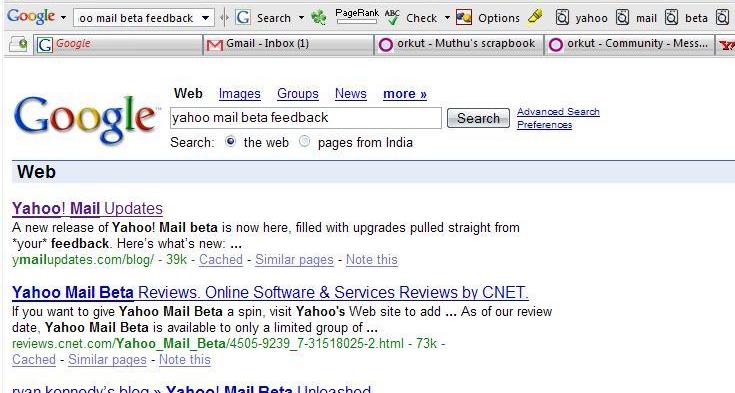
I have always wanted to use the *latest* products. I don't generally mind using beta or even alpha versions of software. Here's my experience with Yahoo! Mail Beta and Yahoo! Help. I usually keep my mailboxes open in Firefox. Whenever new mails come to my mailboxes, I don't take long to check them out. Today, when the new Yahoo! Mail beta changed its page title to reflect the arrival of a new mail, I clicked on its Firefox tab to read the mail. There, I found the first bug. The UI was not consistent as you see in this picture. Well.. bugs are not unusual in any software. So, I wanted to report this bug to Yahoo! so that they can do something about this. I clicked on their Help link, and tried to figure out feedback page using their search feature. I typed in "mail beta feedback" as my query. And, here is the result I got: What the heck.. I am not searching for a person named "mail beta feedback." I had to get back to my trusted friend to search for Yahoo's feedback page. Oh yeah.. the first link Google suggested had the information I wanted. Now I understand why "googling" has become a verb in English, while other search companies are still struggling to get their place on the web. Thanks to Google!!

26 Aug 2006

Match factories in Kovilpatti use MNC approach!!

When I got my first job in that big MNC, I was happy. When I joined the company, I was excited. When I compared it with other Indian companies (especially those I hate), I was pretty much happy that I was in a good place. Of course, that's a good company, in its own ways. But a few things I noticed there were not very much different from a match factory in my native town (Management concept No. 1: வேலை பார்க்கிறவனுக்கு வேலையைக் கொடு, வேலை பார்க்காதவனுக்கு சம்பளத்தைக் கொடு). Those who "knows" how to work have to work day and night and make sure that schedules don't slip. Those who don't know how to code or don't care about the schedules can just come to office, relax, and get back to home earning their salary. Believe me, there are people who don't know how to code (I'm not talking about managers). (Once I had to work with a function that takes more than 135 arguments. True, ladies and gentlemen, people are getting paid to write such code; and it's happening in one of the monster MNCs). If the management believes that they need people in their team, they will recruit whoever is available. All they need is head count. Why bother about quality of the human resource, as long as they can be used to get money from the client. After all, they have few loyal team members who sacrifice their personal life and make sure that project schedules don't slip. Now, when I sit at my home and relax during the weekend, I see my old teammates being online. The whole "responsible" team is online 24 x 7. A few people in the team get paid well according to the company's standards (it's one of the stingy companies in India). Other employees still work for peanuts. (I got 1?00 rupees as my performance bonus for the first year.) Last week when I pinged a good friend of me on a Sunday, he said he was busy. He was there the whole day. For what? There was some project slipping schedules. 4 or 5 memebers of the team were in the office for the whole Sunday. You know what they will get for that? Ugh... let us not talk about that.. they might kill me if they happen to read it. What would happen if it just keeps going? Like me, everyone will quit, but the company's management won't bother. All they need is head count. Quality is something the management has no idea about. They do not know how to conduct interviews; they do not know how to find good people; they do not know how to retain good people. But for sure, they are doing good in the business; and they will continue to do well. It's just that their business model is different; they don't need to worry about quality at all.