Showing posts with label gadget. Show all posts

11 Jun 2016

Thoughts on HP Chromebook 13 G1

When I first heard about HP Chromebook 13 G1, I immediately wanted one. For three reasons: (i) 3200×1800 screen, (ii) USB type C charging, and (iii) the looks. As soon as it became available, I bought the 8GB RAM variant with the Core m5 processor. I have been using it for a few days now; this post is to record my thoughts on this laptop’s hardware.

Things I like
  • This is the first hardware device ever that made me like it for its build quality. I really like the metal build of the machine and its strong screen hinge.
  • USB type C charging. Of course! It’s one of the reasons I even bought this laptop.
  • Keyboard is really nice to type on. Has good tactile feedback. Way better than the 2015 Toshiba Chromebook 2 I was using before.
  • Touchpad is smooth. I can actually use this touchpad for an extended period of time without my fingertips asking me to stop.
  • Some reviewers are not fond of the B&O speakers that come with this laptop, but I like it. (But then, my reference points are Toshiba Chromebook 2 and ThinkPad P50. Coming from these laptops, I would like pretty much anything.) From what I see, this Chromebook 13’s speakers are on par with the speakers of Nexus 9.
  • There’s an LED that shows status when the laptop is sleeping, charging, etc.
    LED glows red when the laptop is charging
Things I neither like nor dislike
  • Although the screen is impressive on paper, it doesn’t live up to the expectations in reality. I believe it’s the same panel that was in Lenovo’s Yoga 2 Pro. I can see pixels on this screen just as I could on the Yoga 2’s screen. Yellow rendered by this screen is the same dull yellow like on the Yoga 2 Pro (expand the “spoiler” to see the colour difference). When I am not actively looking for pixels or colour accuracy, this screen is nice; I can live with this. 
Things I am not a big fan of
  • There’s exactly one USB Type A port. I need to always have a security key inserted into a USB Type A port, so I have zero usable Type A port. I don’t often plug things into my Chromebook but it’d still be nice to have a free port.
  • MicroSD card reader. The only place where I use an SD card is on my digital camera, and it’s a full-size SD card. So this MicroSD card reader is essentially useless to me.
Comparable devices
Anyone considering the m5 variant (with 8GB RAM) or a more expensive option should also look into the base model Chromebook Pixel 2. For less than $200 more, you get a better screen, more USB ports, Type C ports on both sides for easy charging, and more Google Drive storage quota. The HP has an edge over the Pixel in its fanless design and being lighter and thinner. It’s a choice you’ll have to make for yourself. (I am still torn, and I honestly can’t choose between the two.)

18 Dec 2014

First week with my Moto X

I have been using my Moto X for about a week now. Thought of recording some initial impressions.

About me
First, some background on me. I used the G1 when it came out. Ever since Nexus One, I have been using a Nexus phone. Except for Nexus 5, I upgraded to every single Nexus phone as it came out. Moto X is the first ever non-Nexus Android phone I have used.

Why Moto X?
I had been using a Nexus 4 since it came out in 2012. I wanted to upgrade to a newer hardware. I didn’t go with the Nexus 6 because it’s too big. Also, Motorola has a good track record when it comes to pushing new versions of Android more quickly than other OEMs. Getting updates quickly is critical to me.

A month or so ago, a coworker brought a 2014 Moto X with him. I held the phone for about a minute in my hand, and immediately wanted to get one myself. From MKBHD’s review, I learned the Moto X’s camera is not all that bad. Overall, Moto X satisfied many of my requirements, so I decided to buy it. (I got a $140 discount on the phone’s price, which was icing on the cake.)

Ordering the phone
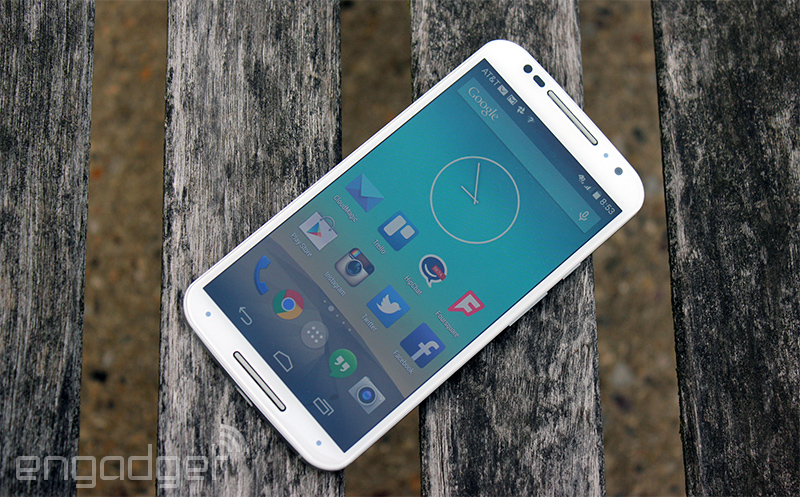
Moto Maker is awesome. Designing and ordering the phone was a breeze. I got to pick and choose colours, which was amazing. All Nexus phones have an all-black front, but with the Moto X, I was able to get a white front... something I have always wanted.

Hardware
The phone is very fast. Surprisingly, Moto X boots a lot faster than its more powerful sibling Nexus 6. (Maybe it’s because of the Nexus 6’s encrypted storage, which is known to slow things down.) In my usage, I never had to wait for the phone; it was fast in everything it did.

The screen is gorgeous. Upgrading from Nexus 4’s dull screen, this is a pleasure to look at. I’d put this screen above the Nexus 9’s screen (the other Android I use on a daily basis). The camera is passable (sample pictures).

With the top and bottom looking almost the same, it’s kinda hard to tell if you’re holding the phone upside down. But you’d quickly learn to orient the phone correctly. The edges are metal, which made it uncomfortable to hold the phone while talking. Maybe this is another thing that I’ll get used to over time.

The phone does not have a stereo speaker like the Nexus 6, but it’s pretty loud. Notifications and phone calls are also much louder than the Nexus 4. Finally, I can hear when my phone rings in the next room. In-call sound clarity was also noticeably better than the Nexus 4.

Software
This is the first time I use a non-Nexus phone, so I wasn’t sure how Motorola’s software additions will affect the experience. So far, I have been fairly happy with what Motorola has chosen to add to the phone.

The phone has infrared sensors to detect when you reach for the phone. The moment I am going to grab the phone, screen turns on automatically. I never have to press the power button to turn the screen on. It saves maybe half a second, which may not seem like a lot. But it does matter because I know I am annoyed when my Nexus 9 doesn’t automatically wake up when I want to use it.

Similarly good is “shake to open camera” gesture. With my previous phones, I’d have to press the power button, open camera by sliding the lock screen, and then start shooting. Now I can simply shake without even having to look and the camera is ready. I really like it. The camera is supposed to capture more shots than the ones you take and suggest you to keep the better shot. I haven’t had the phone long enough to actually need that feature yet.

Possibly my most favourite feature is you can customize the “Okay Google” phrase and choose anything you like. I have never liked saying Okay Google, so this is a big plus for me. Speech recognition is good, and voice commands are useful. When I need to do something quick — like a unit conversion or adding a reminder — I turn to my phone and ask it to do it. No need to wake it up; no need to unlock the phone. It just works.

Motorola slowly teaches you how to effectively use the phone by showing notifications about new features every once in a while. It’s way better than dumping everything at you while setting up the phone.

Gripes
Nexus phones come with a dialer app that has two nifty features: you can search for local businesses from within the dialer and it does reverse business lookup when you are making or receiving a call. If I want to call Pizza Hut, I can type Pizza Hut in the search box of the dialer app and it’ll find local Pizza Hut’s phone number. Similarly, if Fedex calls me to alert me about a package, caller ID would show “Fedex” instead of the number they are calling from. Moto X does not come with this dialer, which is a bit of a letdown.

I am mostly used to it now, but I sometimes find the phone a little too large to hold and use. Especially when I have to use it one handedly.

Conclusion
Overall, I have been very happy with the Moto X. If you are on the fence on buying this phone, I’d urge you to just buy it. You may not even want to go back to a Nexus phone in the future. :)

30 Dec 2013

A Next Page button can make Kindle Paperwhite 10x more fun

Kindle Paperwhite is small: it has a 6-inch screen while Nexus 7 has a 7-inch screen and iPad Mini has a 7.9-inch screen. The Kindle is lighter too: it weighs 206 grams while Nexus 7 and iPad Mini weigh 290 grams and 331 grams respectively.

Despite being small and light, the Kindle is hard to use single-handedly. I can hold the reader by wrapping my hand around its back, but then I can’t use any of my fingers to turn pages. (It’s also a bit uncomfortable to hold it that way, actually.)
I can hold it on just one side, but turning pages will still be impossible with one hand. Turning pages will require me to move my thumb onto the screen.
Adding a hardware Next Page button right where my thumb is will make it easy to use the Kindle with just one hand. Why didn’t you think of that, +Amazon.com?

Kindle: Season 2

My relationship with the Kindle has been a bit unstable. I bought my first Kindle in June 2010. There were certain things that irked me about it, but in general I liked it. Overall, the number of books I read went up because it made reading easier.

After I got myself an Android tablet, I started reading on the tablet most of the time because the Kindle was very slow. As time went by, the Kindle started to simply gather dust at home, so I sold it off in May 2012. One and a half year later, I find myself not reading any books. Whenever I try to read on my Nexus 10, the experience isn’t fun because the device is so heavy it’s not at all comfortable to read on. Naturally, I give up reading and move on to doing something fun... like watching videos.


Not reading anything has been bothering me for a while, and today I decided to give Kindle another try. The new paperwhite is a lot superior (and seems a bit faster) than the 2nd generation Kindle I had before. Hopefully, this Kindle will put me back on track and I’ll read a few books every year. Happy 2014, everyone!

2 Feb 2013

Just how fast is USB 3.0?

USB 3.0 isn’t exactly new, and everyone knows how fast it is compared to USB 2.0.  I bought my first USB 3.0 device yesterday — an external hard disk — and I was curious how fast it really was.  I used hdparm as described in an Ask Ubuntu answer to compare the speeds of 3 different storage devices I had.

Fastest was, unsurprisingly, the internal mSATA SSD my laptop had, at about 180MBps.  The new USB 3.0 hard disk (a Western Digital one) managed to read data at 105MBps.  This number is very impressive when juxtaposed next to my old USB 2.0 drive (a Hitachi) which could read only at around 34MBps.

Raw numbers for the curious and for posterity:
% sudo hdparm -Tt /dev/sda    # Internal SSD
/dev/sda:
 Timing cached reads:   8624 MB in  2.00 seconds = 4314.43 MB/sec
 Timing buffered disk reads: 544 MB in  3.02 seconds = 179.89 MB/sec

% sudo hdparm -Tt /dev/sdb    # USB 3.0 external HDD
/dev/sdb:
 Timing cached reads:   8584 MB in  2.00 seconds = 4293.72 MB/sec
 Timing buffered disk reads: 318 MB in  3.01 seconds = 105.54 MB/sec

% sudo hdparm -Tt /dev/sdb    # USB 2.0 external HDD
/dev/sdb:
 Timing cached reads:   8434 MB in  2.00 seconds = 4219.40 MB/sec
 Timing buffered disk reads: 102 MB in  3.03 seconds =  33.69 MB/sec

9 Sept 2012

Is screen the only advantage tablets have?

Quite often, I find myself wanting to read on my Nexus 7 than on my laptops.  Checking my Google Reader, reading any article that’d take more than a couple of minutes, reading Kindle books... I prefer the tablet for all these.  This is not surprising because the Nexus 7 has a 216-dpi screen while my laptop has an incomparable 96-dpi screen.

When it comes to doing some real work... work that involves multitasking and/or precision, touch devices are very inadequate.  Think of writing code, for instance.  I’d have 6+ browser tabs open with various manuals, one terminal for building and running the code, one or two more terminals for other random stuff, one editor/IDE window (usually GVim; occasionally Eclipse), and a few more browser tabs that are pure distraction (Gmail, Google+, etc.)  A touchscreen device without overlapping windows just won’t work for this use case.

Android’s multitasking UI would improve over time, but I doubt if it can catch up with current desktop OSes in the next two years.  On the other hand, it’s likely that before the end of 2013 there will be enough high-res monitors and laptops in the market.  When that happens, I may use the laptop a lot more frequently than the tablets.

While tablets may replace laptops for quite a few people going forward, I don’t see myself giving up the functionality I get from desktop OSes.

4 Feb 2012

Speed Matters

I bought a Samsung N150 netbook in early 2011.  That’s a tiny little laptop with an Atom processor, 2GB RAM, and a 10” screen.  It was tolerable, but slow nevertheless.  A few months later, I bought a Galaxy Tab 10.1v.  From then on, I started preferring the tablet for any task, and used the laptop only for things that the tablet is not very good at.  (Anything that involves typing text or multitasking.)

In December 2011, I bought a Toshiba ultrabook, which is way faster than the Samsung laptop.  Now I see that I prefer to use the Toshiba over the tablet.  I guess it’s not the form factor that makes me like or dislike a device, but the speed.  I just hate waiting for machines.

10 Jan 2012

Opening a Toshiba Z830 laptop

Opening a Toshiba Z830 is fairly simple — just remove all the screws from the back of the laptop and the cover would come off with no effort.  But there’s one tricky part: there’s a hidden screw at the center of the laptop.


This is a Torx Security screw so you’d need an appropriate screwdriver.  This screw is also covered by a plastic piece that you’d have to remove first to even see this screw.  Once you have removed all 14 screws, the machine opens up very easily.


9 Jan 2012

Samsung Galaxy Nexus: first impressions

I have been using a Samsung Galaxy Nexus for a few days now.  I have been an Android user since the G1 days; there isn’t much I have to say about the software in this post.  I like Android and I don’t think any other phone software is a good choice for my usage.

Talking about the Galaxy Nexus’s hardware, it’s an enormous phone.  Very wide, but it manages to fit in my hand by being very thin.  I like the feel of holding the phone in my hand (disclaimer: I have never held an iPhone for more than a few minutes).  Battery life is good; super fast camera doesn’t look like a big improvement, but I’ll know the difference only when I have to use a slower camera.  The phone is crazy fast in pretty much everything it does, and fast is almost always good.

One of the things I was excited about was the phone’s higher (than my previous phone, Nexus S) display resolution.  Text on the Galaxy Nexus is clearly crisper, and gives a better reading experience.  But I can still see “pixels” on the screen... more specifically tiny “holes” on white surfaces.  Apart from that I don’t really have any concern.

21 Dec 2011

You cannot upgrade Toshiba Z830’s SSD (yet)

When I saw the Toshiba Z830 in a shop near my house, my jaw dropped.  Because that thing weighs just 1.1kg!  The only thing that felt inadequate was storage: it comes with only an 128GB SSD.  Being the clever thing I am, I thought I can easily replace the SSD with the 240GB one I had.  Except, I wasn’t that clever in this case.

Z830 uses an mSATA SSD (to save space), and the largest available mSATA SSD in the market is 128GB (source).  So, if you’d need more than 128GB storage, don’t buy the Z830 (or anything that uses mSATA) yet.

12 Apr 2011

My experience with Samsung N150+ laptop

I bought a Samsung N150+ laptop about 2 months ago.  I have been extensively using the laptop since then.  I use it for a lot of browsing, literally no gaming, sometimes to watch videos, occasionally writing some code.

After using it for a while, I think I'm quite happy with the device.  I like the fact that it has an anti-glare LED display and very portable at only around 1.25kg.  There are, of course, a few shortcomings.

The machine isn't very powerful.  If you want a lot of processing power, this laptop isn't for you.  I believe that we only get what we pay for, and the price point of 17,500 INR justifies the reduced horsepower.  (It has 2GB of RAM, which is twice as much as most comparable laptops.)  Also, the fact that I run Kubuntu helps.  I haven't tested extensively, but I believe that Windows 7 will be slower on this machine than Linux.

I hate wide screen displays.  This laptop's 10" screen also has wide screen aspect ratio (1024×600).  I recently figured out that keeping the task bar on the left side makes the effective screen aspects a little less wide.  It also gives a little more vertical space to apps.


Overall, I am quite happy with my purchase.

5 Mar 2011

My dream tablet

Yes, I said I want a free tablet.  If I am only wishing, I'd rather wish a detailed wish ;)  I want a tablet that:
  • has cellular data connectivity
  • has an LED screen, preferably something like a retina display
  • has a screen with matte finish (original iPad doesn't make the cut; not sure if iPad 2 does)
  • has a reasonably big screen (7-inch screens don't make the cut)
  • blends well with my online life, IOW, integrates well with Google services (i.e. runs Android)
  • lets me read and write Tamil (Android, as of version 3.0, doesn't make the cut)
  • is lightweight (Xoom doesn't make the cut)
  • has a really good battery life (10 hours usage time sounds pretty good)
  • has a scratch resistant screen (gorilla glass, e.g.)

6 Jun 2009

Two mobile phone tips

Note Taking
Mobile phones are handy for scribbling down notes on the go.  But the trouble is when you want those notes on your computer so that you can merge the notes to an existing document or continue editing the notes with a bigger screen and keyboard.

I use AK Notepad on my Android G1 phone for taking notes.  Whenever I need a note from my phone on my computer, I choose the option to send the note by email.  That opens Gmail's mail compose interface with the note's contents.  I save it as a draft and force an email sync (by choosing Menu > Refresh).  Now, Gmail in my computer browser has the note as a draft.  I can now copy the note text and discard the draft.

Opening Long URLs
Let's say you are viewing a web page that has a long URL on Firefox on your computer, and you want to open the same page on your mobile phone.  Mobile Barcoder Firefox extension creates a 2D barcode (known as QR code) for the current URL.  You can use an application like Google's ZXing to scan the barcode from the computer screen and open the URL on your phone's browser.

26 May 2009

Why I'd vouch for a Treo?

I was using a Treo 650 sometime back and I really liked it.  I'd rate it as the best phone I have used (though I haven't used many smartphones.  I have only used Nokia 7710, Palm Treo 650, BlackBerry Curve 8320, and now an HTC Dream).

I love the way my Android phone tightly integrates with my Google account.  I don't have to worry about backing up my contacts now and then, as they are synced to my Gmail contacts automatically.  The UI (in general, as a computing device, not as a phone) is good.  The device is powerful enough to run all the apps I want to run in parallel.  Lots of applications are available for free download.  The experience I get with this phone is WAY better than any Nokia phone I have ever used.

I still think that my generations-old Treo was a better phone in terms of usability.  Most Palm phones look ugly, I agree; but I don't mind my phone being ugly as long as it does its job really well.  Treo had a very good battery life -- I had to charge it only twice or thrice a week.  The UI was very intuitive and uncluttered.  Everything you need is just there -- ringer volume control and silent mode switch are hardware controls, so you have access to them all the time.  You don't have to switch off the whole device, take the battery out, etc. to change SIM card or memory card.  You can adjust screen brightness with a global shortcut key.  When you are trying to read an SMS under bright sun you can increase the brightness then and there without having to close the SMS application.  There is a universal search provided by the phone that searches the data stored by all applications.  When I search for, say "Siva", it will show me the contacts that have the name (or a note or any contact field) Siva, SMS messages, email messages, notes, documents that has the word "Siva".  It's like Google Desktop for your phone.  (Sadly, such a feature is not in Android phones.)

Maybe the new Palm Pre is going to be a tough competition for iPhones and the Androids.  Or maybe not.

Update: Looks like the next version of Android OS will have a feature to search the content in phone, similar to what the Treo had.  (source: Android Community post)

14 Feb 2008

Shopping for a phone. Again!

I once wrote how much I liked my Palm Treo and why I won't think of switching to another phone though my Palm annoys me sometimes. Well, as they say man proposes and god[*] disposes. Now I have to buy a phone for me. I'm afraid I might end up buying a Nokia phone (I hate Nokia phones' UI, in case you don't know already). Ok, here is the story. My company has given me a BlackBerry (Curve 8320). So now I carry around two bulky smartphones (including my personal Palm), which is not a very good experience. Since I can use the blackberry for all my smartphone needs, I am thinking of getting a small, light-weight, non-smart phone to replace my Palm. At a first look, I think I might buy either a Nokia 3500 or a Nokia 7500 Prism. Unlike my all other phone buying decision, I think I will visit a physical shop and make a decision after seeing real phones. In the meanwhile, if you know of a good phone tell me about it :)
* I am forcing myself to use small 'g' for god. Not that I don't respect god; but I kinda like it this way :)

28 Jan 2008

My Bose Story

"After this there's no turning back!" This is not only true with taking the red pill. It's also the case with getting used to comfort. I bought Bose in-ear headphones a few months back. As many reviewers have warned, the tips of the earphones fall out easily. I lost mine twice and luckily found them back. When my friend borrowed my earphones he didn't pay enough attention to the tips so it got lost. (In my opinion, any device that needs special care/attention is badly designed.) I play music almost all the time when I drive. Today I went to Bose store to buy the tips and I was listening to music on the way using my old Panasonic earphones . I couldn't believe myself when my ears started paining within 30 minutes of listening. I'm glad that I bought the slightly overpriced Bose earphones, as they are doing good to my ears. If you are a heavy earphone user, consider getting something really good. I bet it's worth the money.

8 Jan 2008

Got DataOne

The white box on the left-hand side is my wireless router. The black one on the right-hand side is my ADSL modem. So well, what are they doing at my home? I just got a new BSNL DataOne connection, and these devices help me now update my blog with this news :) I am happy that finally I have got a "good" Internet connection. I am sad at the same time that I cannot continue to support MSify any more. My Sify account is active for at least two more months. If I get any bug report or feature request within this time-frame, I will sure work on it. I won't even mind keeping my Sify connection to support MSify if there are users who want me to maintain it. So if you are a user, please let me know if you want me to keep supporting MSify. If you use Sify Broadband but not MSify, I encourage you to try it out and let me know your comments.

23 Dec 2007

Encoding iPod Video

You never know how many times I tried to encode videos for my iPod and could not quite figure out how things work. Oh yes, I know there are a lot of tools available for Windows (although most of them are commercial software). On Linux, I was pretty sure it was possible to encode and transfer movies to my video iPod. But oh man, it was hard to actually figure out the tools to use and the options I had to choose for getting an iPod-friendly video. Several times I tried installing ffmpeg, building it from source, installing other libraries that ffmpeg depends on, blindly following directions from forums, etc. But the result was the same: I could not invoke ffmpeg successfully to get an iPod-friendly video. It always complained about some incorrect command-line option, or missing component, or something else which I couldn't fix. Today I finally found the tool that can convert give me iPod videos! I have been using Avidemux for quite some time to do some video editing, without ever realising that Avidemux can write MP4 files that iPods like. Here is the configuration for output video:
  • Choose Mpeg4 (lavc) as the video codec.
  • Click Filters button and change the video size to 320x240. If your source video is not compatible with this size, resizing will result in skew/stretch of the video. You may add some black borders to make the size, a multiple of 320x240. For example, I added 96 pixels on top and bottom to make a 640x288 video to 640x480. Then resizing it to 320x240 will not change the aspect ratio of the video.
  • Choose FAAC as the audio codec. Click on Filters and choose Stereo for Mixer option.
  • You can change audio bitrate by clicking on Configure button.
  • Choose MP4 as the video format.
And that's about it. Choose Save > Save Video... from File menu to get your video :-) Edit: Added the mention of Stereo type for audio. Otherwise iPod won't play the audio if your source audio has more than 2 channels. Also removed the step of setting video bitrate, which is not quite necessary.

30 Nov 2007

When I bought my Palm Treo 650 about a year and a half ago, I was sooo glad that I bought it for a really cheap price. It was my first international trip. I was in our Silicon Valley office for the new-joinee training. I don't know if I learned enough stuff during the trip; but I definitely bought quite a lot of stuff. In addition to buying electronics for me, I also bought plenty of shirts, a lot of stuff from Google Store for me, my friends, Pascal, etc. Only when I had to pack all the stuff I realized how much stuff I had bought. After starting to use the Treo, I started liking it more and more. It's no-nonsense UI, ease of use, build quality, battery life, quality of the touchscreen, integration with my beloved Linux computer made me happy. Those who believe "reality is far from ideal" are correct. The phone has its own glitches. But you know, it was far better than the Nokia 7710 I was using. A few months back I got tired of big phones. Wanted to get a phone which I can use to make calls, with no fancy features. I settled for a Nokia 5200, which is a pretty low-end phone with Bluetooth support. I could not use it for more than a month. Nokia's UI made me grumpy. Even when I fondly used my Nokia 3120 and had great love for Nokia phones, I hated their UI. (quick question: what is the average number of keypresses you need, to do anything on a Nokia phone?) And a few other minor usability issues. So I switched back to my Treo. Last week I was bitten seriously by Treo's infamous "ghost jack" problem. I decided to change my phone and started looking for a good phone. I didn't want to buy some really good phones for personal reasons, including iPhone (no thrid-party apps), HTC Touch or S710 (yucky Windoze mobile OS). And I already have an aversion towards Motorola's and Nokia's. Syncing with a Linux computer is something that is not support by almost all the phones. So decision made: be happy with the Treo until some superstar company releases an Android phone.